 USD
USD


Stepping into the world of smart glasses with the Ray-Ban Meta is an exciting leap in wearable technology. These glasses blend iconic style with powerful features like open-ear audio, photo capture, and AI interaction. However, a practical question often arises for new and prospective owners: how do you keep them powered? More specifically, many users find themselves asking, "do the ray ban meta glasses come with a charger" right out of the box. This question is crucial, as the answer directly impacts your initial setup and daily usage routine.
Understanding the charging ecosystem is key to maximizing your experience. This guide will not only provide a definitive answer but will also explore the charging mechanism, offer solutions for extended use, and introduce a highly recommended accessory that transforms how you power your glasses.
What's in the Box? Unpacking the Ray-Ban Meta Charging Setup
Opening the unique packaging of the Ray-Ban Meta, you'll find the smart glasses securely placed inside the charging case. This charging case is the core component of the entire charging system. In addition, the box contains some essential items such as a microfiber cleaning cloth and a user manual. These glasses come with a charging system, but it's not a traditional wall-mounted charger.
The package includes the following components:
- Charging Case: It serves as both a protective storage case for the glasses and a power bank.
- USB-C Cable: You will receive a USB-C to USB-C cable for connecting the charging case to a power source.
Therefore, to charge the glasses case, you must use a USB-C power adapter to connect the charging case to a computer's USB port or a Type-C power outlet. Once the glasses case is placed inside, wireless charging is possible.
How Does the Charging Process Work?
The Ray-Ban Meta glasses utilize a proprietary, contact-based charging system. Inside the charging case, there are small metal pins that align with corresponding contacts on the inner arms (temples) of the glasses. When the glasses are correctly placed in the case and the lid is closed, this connection is made, initiating charging. A small LED light on the case indicates the charging status. The case itself provides multiple full charges for the glasses before they need to be recharged via the USB-C cable.
What Are the Limitations of the Standard Charging System?
While the included case-and-cable system is functional for basic use, it presents certain constraints for active, all-day users.
The primary limitation is the requirement to remove the glasses and store them in the case to recharge. This interrupts continuous use. If you're on a long video call, capturing an extended timeline of photos, or listening to music during a full day of travel, you must pause your activity to power up. The case, while portable, is an additional item to carry, and forgetting it means you cannot charge your glasses on the go.
This inherent gap in the user experience has led to the development of innovative third-party solutions designed to provide seamless, uninterrupted power.
How Can You Achieve Truly All-Day, Uninterrupted Power?
For users who demand more from their smart glasses, a supplemental charging accessory is not just convenient; it's essential. The ideal solution would allow you to charge the glasses while wearing them, eliminate battery anxiety, and integrate cleanly with the original design. This is precisely where the PRISMXR Carina C1 accessory system excels.
Introducing the PRISMXR Carina C1: The Ultimate Power Upgrade
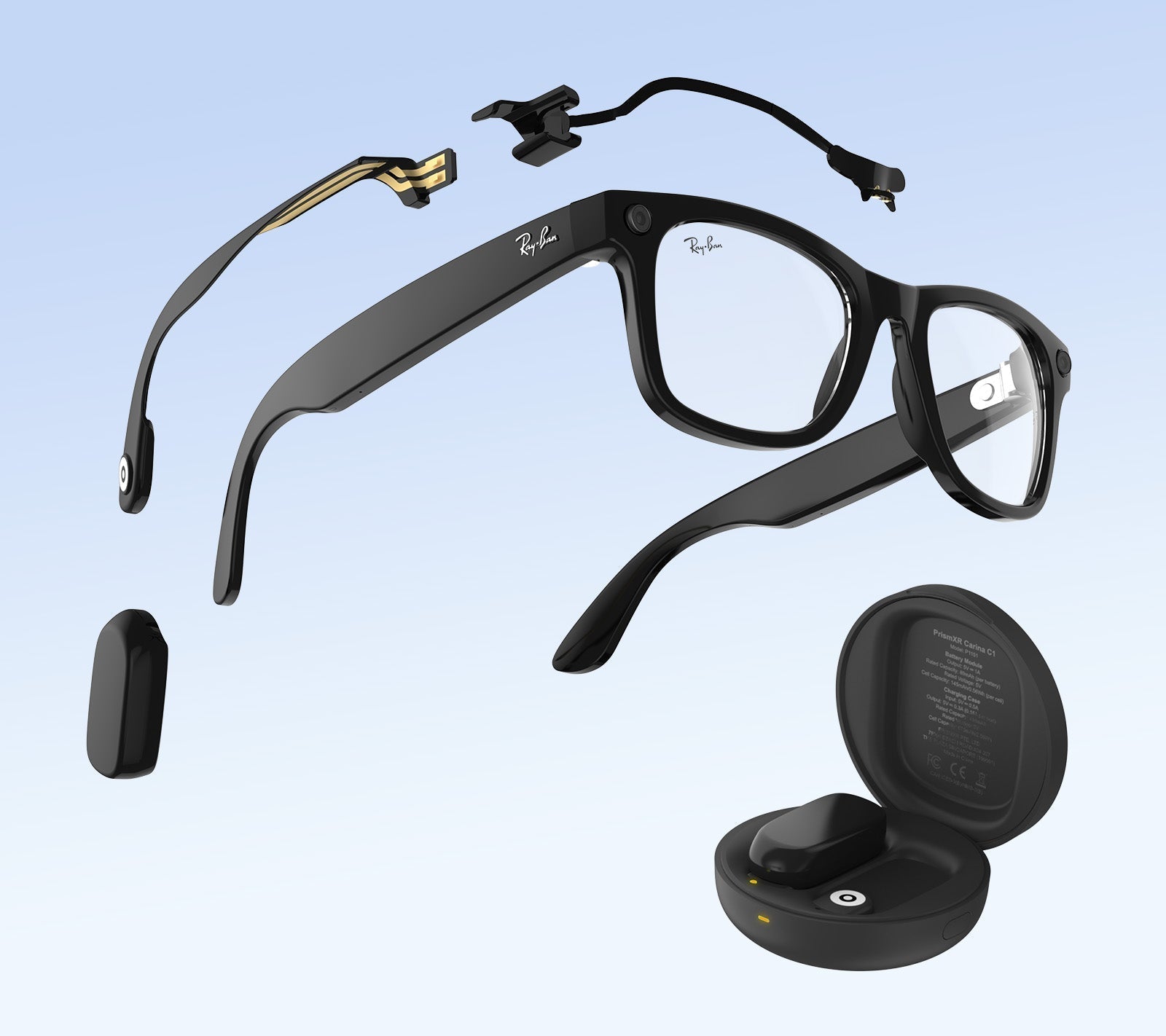
The PRISMXR Carina C1 is a meticulously engineered external battery system designed specifically for Ray-Ban Meta smart glasses. It addresses every shortfall of the standard charging method with an elegant, functional design.

Carina C1 Charging Kit for Ray-Ban Meta Glasses
- All-Day Power & Dual Charging Options: Swappable battery packs or a snap-on magnetic cable keep your glasses powered without interruption. Each battery adds 2 hours of use, and with a combined 965 mAh capacity from the two batteries and charging case, you can enjoy up to 12 hours of total power. This system effectively triples or quadruples your active usage time, making it possible to use your glasses from morning until night without seeking an outlet.
- Invisible Fit & All-Day Comfort: An ultra-slim LDS circuit design extends the charging contacts without adding bulk. Each mount is just 1mm thin and weighs only 3.8g, keeping your glasses sleek, comfortable, and virtually unnoticeable while wearing. The accessory attaches discreetly to the existing temple structure, preserving the iconic Ray-Ban look.
- Charge While Wearing: This is the transformative feature. You can keep your glasses charged and ready while recording, chatting with AI, capturing photos, or listening to music. Simply snap a fresh battery pack onto the magnetic contacts on the temple, and charging begins immediately—no need to stop what you're doing.
- Case & Stand Compatible: Works seamlessly with the original charging case and PRISMXR Carina S1 stand—no removal required. Please note, it’s not compatible with third-party charging docks or polarized clips. This ensures your existing ecosystem remains functional.
What Do You Get with the Carina C1?
The kit is comprehensive, providing everything needed for extended power management:
- Detachable Battery x 2
- Battery Charging Case x 1
- Magnetic Charging Cable x 1
- Nose Bridge Contact Mount with FPC x 1
- Temple Charging Cradle x 1
- USB-C to USB-C Cable x 1
- Cleaning Wipe x 1
For travelers, content creators, professionals in the field, or anyone who simply doesn't want to think about battery life, the Carina C1 is a logical and powerful upgrade.
What Other Accessories Complement the Ray-Ban Meta Experience?
Beyond power, protecting your investment and enhancing functionality are wise considerations. Alongside the Carina C1, consider the following:
- Protective Lens Kits: Prescription or non-prescription lens inserts can protect the built-in cameras from scratches if you plan to place the glasses face down.
- Specialized Carrying Cases: For additional protection beyond the charging case, a hardened travel case can be useful.
- The PRISMXR Carina S1 Stand: As mentioned in the Carina C1 compatibility, this dedicated stand offers a stylish way to store and display your glasses while ensuring they are always charged and ready. It provides a convenient home base on your desk or nightstand.
Conclusion: Powering Your Smart Glasses Journey
To conclusively answer the prevalent questions: Do the Ray-Ban Meta glasses come with a charger? They include a charging case and a USB-C cable, requiring you to supply a standard USB-C power adapter. For basic use, this is sufficient. However, the need to interrupt usage to charge can be a significant drawback.
For a seamless, all-day experience, integrating a dedicated accessory like the PRISMXR Carina C1 is highly recommended. It solves the core power limitation elegantly, allowing you to charge while wearing the glasses and dramatically extending usable battery life without compromising on comfort or style. By understanding your charging options, you can fully unlock the potential of your Ray-Ban Meta smart glasses and integrate them effortlessly into your daily life.
Frequently Asked Questions (FAQ)
Q1: Can I use any USB-C charger to charge the Ray-Ban Meta case?
Yes, you can use any standard USB-C charger or a USB-C port from a computer or power bank. There is no special power requirement, making it versatile and easy to charge on the go.
Q2: How long does it take to fully charge the glasses and the case?
The Ray-Ban Meta glasses themselves charge from 0 to 100% in approximately 60-80 minutes when placed in a powered case. The charging case takes about 2-3 hours to fully recharge via the USB-C cable, depending on the power source.
Q3: Will using a third-party battery accessory like the Carina C1 void my Ray-Ban Meta warranty?
Using third-party accessories typically does not void the manufacturer's warranty on the glasses themselves, unless the accessory directly causes physical damage. The Carina C1 is designed as a non-invasive, clip-on system that uses the existing external charging contacts, posing minimal risk. However, it is always prudent to review Meta's warranty terms for specific exclusions.
When do you expect the availability of the Carina C1 in the Ray-ban large size?