 USD
USD


There's nothing quite like the immersion of virtual reality. You're scaling a mountain, dancing at a concert, or exploring a distant galaxy when it happens—a dreaded low battery warning shatters the illusion. You fumble for a cable, trying to plug in without breaking your stride, and suddenly, the magic is gone. If this scenario sounds familiar, you're not alone. Managing power is one of the biggest pain points for VR enthusiasts. But what if there was a way to ensure your headset is always ready for action, without the cable clutter and constant plugging and unplugging?
Enter the world of dedicated charging docks. These sleek, purpose-built stations are game-changers for VR organization and convenience. In this guide, we’ll dive deep into why a dedicated dock, like a Meta Quest charging dock or an Oculus charging dock, is an essential upgrade for any serious VR user. We'll also explore how the principles of great dock design are being applied to the latest headsets, ensuring you never have to face the low battery panic again.
The Hidden Cost of Cable Chaos
Let's be honest: the standard charging solution that comes with your headset is functional, but it's far from ideal. You have a cable snaking across your desk or floor, the headset itself is often left lying on a surface where it can get scratched, and the controllers? They're probably rolling around in a drawer, their batteries a constant mystery. This disorganization isn't just an eyesore; it has real consequences.
Constantly plugging and unplugging the USB-C cable wears down the port on your expensive headset over time. A loose connection can lead to intermittent charging, leaving you with a dead device when you most want to use it. Furthermore, searching for separate chargers for your headset and controllers wastes precious time and adds unnecessary frustration to your VR routine. While portable solutions like battery power packs or a high-quality c type battery are great for on-the-go top-ups, they don't solve the problem of everyday storage and convenience at home.
A dedicated charging dock eliminates these issues entirely. It provides a single, designated home for your entire VR ecosystem.
Why a Meta Quest Charging Dock is a Must-Have Accessory
For owners of the Meta Quest 2, Quest Pro, or Quest 3, a dedicated Meta Quest charging dock is arguably one of the most impactful accessories you can buy. It transforms the way you interact with your headset on a daily basis. Instead of seeing a tangle of wires and a headset lying flat, you see a neat, organized station that looks like a piece of modern tech art.
The primary benefit is effortless charging. The beauty of a dock lies in its simplicity. You finish your VR session, place the headset onto the dock, and set the controllers in their designated spots. That's it. Magnetic contacts or precisely aligned pogo pins make a connection instantly, beginning a reliable charge without you ever having to locate a cable port. This "drop and charge" mentality means your headset and controllers are far more likely to be fully charged for your next adventure.
Beyond power, a dock provides superior protection. A good Oculus charging dock cradles your headset's lenses away from dust and sunlight, which can cause permanent damage. It also holds the controllers securely, preventing them from being knocked off a table and damaged. It’s a simple solution that preserves your investment and keeps your gear in pristine condition.
Introducing the Future of Charging: The Carina D1 for Apple Vision Pro
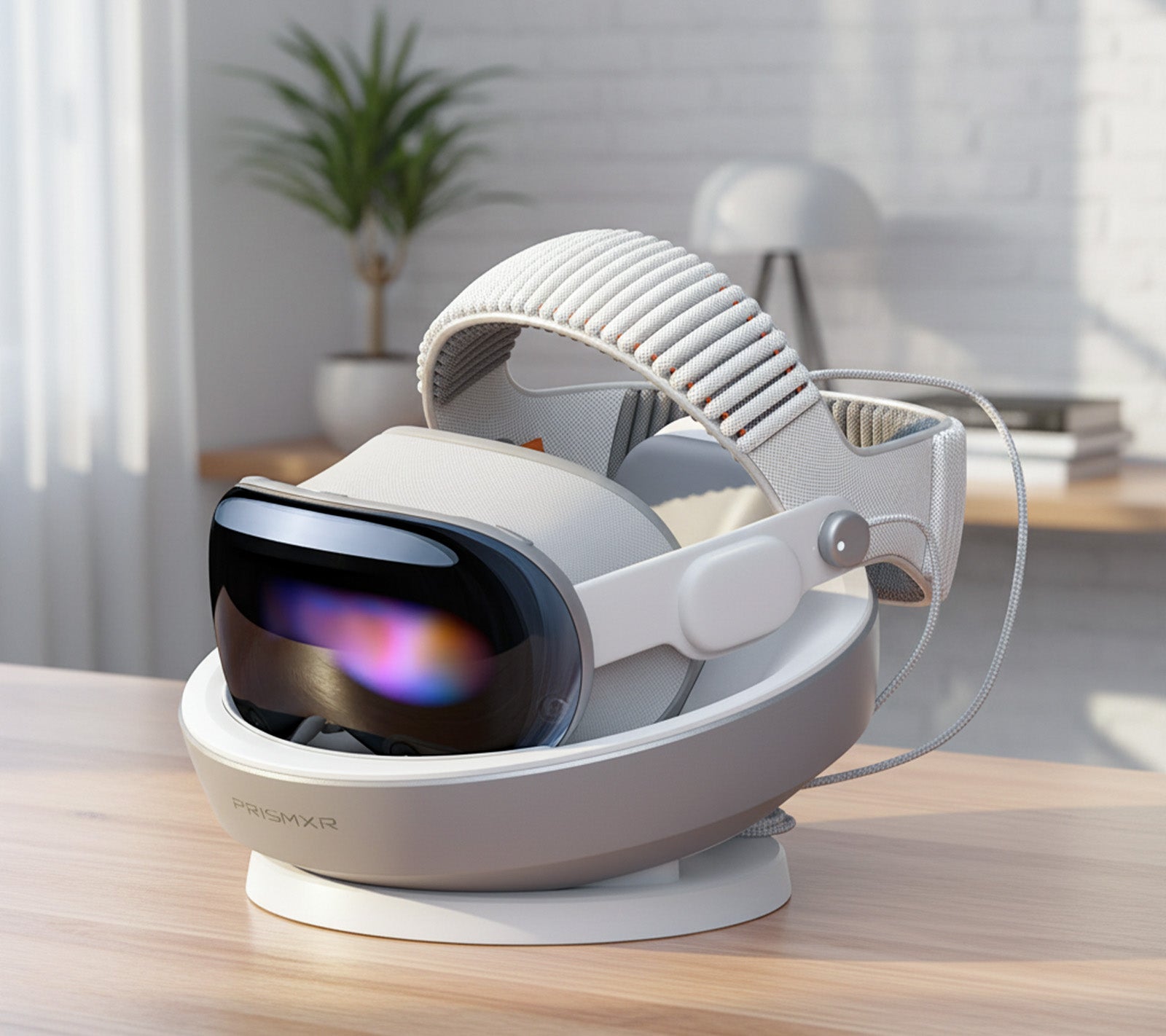
The same design philosophy that makes a Meta Quest charging dock so valuable is now being applied to the next generation of spatial computing. Meet the Carina D1 Charging Dock for Apple Vision Pro, a product that takes the charging station concept to a new level of sophistication and performance.
This isn't just another dock; it's a thoughtfully engineered hub designed specifically for the Vision Pro ecosystem. Let's break down the features that make it stand out.
Unmatched 65W Ultra-Fast Charging
Speed is critical. The Carina D1 features 65W ultra-fast charging, capable of bringing your Vision Pro battery to 80% in just 40 minutes. This is a game-changer for impromptu sessions or when you need a quick power boost between meetings and entertainment. No more waiting around for hours—get back into your digital world almost instantly.
A Design That Cares for Your Gear
Every aspect of the Carina D1 is designed with your device's safety and aesthetics in mind.
-
Soft to the Touch: The dock is finished with a premium silicone material that feels remarkably soft. This not only provides a luxurious feel but also reliably protects your Vision Pro and its battery from scratches and dings every time you place them down.
-
Nest Bionic Design: Inspired by the natural, secure form of a bird's nest, this design offers a compact and organized storage solution. Your headset and battery have a dedicated, snug home, making them easy to retrieve and store while keeping your space tidy.
Thoughtful Features for a Clutter-Free Life
The Carina D1 goes beyond basic charging with intelligent features that enhance your daily routine.
-
Cable Storage: We've all battled with messy cables. This dock comes with a built-in cable management design, neatly tucking away the battery cable to maintain a clean and minimalist desktop.
-
Stable and Secure: Your peace of mind is paramount. The dock is equipped with a full suite of protection features, including safeguards against over-current, over-voltage, overheat, and overcharge. You can trust that your valuable Apple Vision Pro is charging safely and reliably.
-
USB-C Port Free: The dock utilizes a direct connection, freeing up the USB-C port on your battery. This seamless integration ensures you consistently get that ultra-fast 65W charge without the wear and tear of constantly plugging and unplugging a cable.
What to Look For in Any VR Charging Dock
Whether you're shopping for a Meta Quest charging dock or a dock for another device, certain key features separate the best from the rest. Keep this checklist in mind:
-
Secure Fit and Contact-Based Charging: The dock should hold your headset and controllers firmly, using magnetic pogo pins for a seamless connection. Avoid docks that require you to plug a cable in each time.
-
Simultaneous Charging: It should charge the headset and all controllers at the same time from a single power source.
-
Safety Protections: Look for built-in protections like surge protection, over-current, and overcharge prevention to keep your expensive electronics safe.
-
Stable Base and Non-Slip Materials: A heavy, weighted base with non-slip padding prevents the dock from tipping over when you place your gear on it.
-
Aesthetic and Form Factor: Choose a dock that complements your space. A compact, well-designed dock looks great and encourages consistent use.
Make the Smart Upgrade Today
Investing in a high-quality charging dock is one of the simplest and most effective ways to enhance your VR or spatial computing experience. It’s an upgrade you’ll appreciate every single day. It banishes cable clutter, protects your investment, and, most importantly, guarantees that your device is always charged and ready to go the moment inspiration strikes.
Don't let a low battery interrupt your flow again. Embrace the convenience and elegance of a dedicated charging solution. Say goodbye to the chaos and hello to a perfectly powered and organized tech life.